
Add a funding source to a customer
Overview
Funding sources are methods that customers can use to add funds to their vaults.
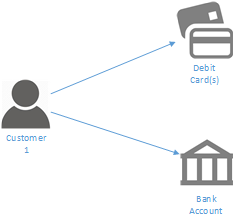
Customers can have more than one funding source, and can use any of them to send money into a wallet, or withdraw money from a wallet..
A funding source can be a:
- Debit Card
- Bank Account
Each type of source requires different information to be set up
Each funding source can be assigned a unique name to help identification.
Creating a funding source
1. Get the ID of the customer
When they are created, vaults must be assigned to a customer. The first step is therefore to obtain the Id of the customer who will own the vault.
When you create a customer object the result will contain a unique id that can be used to identify the customer.
Below is the example response when a Natural Customer object is created.
{
    "id": "string",
    "customerType": "string",
    "nameDetails": {
      "title": "string",
      "firstName": "string",
      "lastName": "string"
    },
    "number": "string",
    "thumbnail": "string",
    "address": {
      "addressId": "string",
      "address1": "string",
      ...
    },
    "createdDate": "2017-05-23T23:13:11.931Z",
}
Using the ID from the above request construct a new JSON object
2. Construct a new request
To create a new source different data are required depending on the source type.
For Debit Cards
| Field Name | Description |
|---|---|
| Card Number | The long number from the front of the card |
| Expiry Month | The month that the card will expire |
| Expiry Year | The year that the card will expire |
| CVC Number | The 3 Digit number from the signature strip of the card |
Please note that cards must be in the name of the customer, and registered to the customers current address
For Bank Accounts
| Field Name | Description |
|---|---|
| Account Number | |
| Sort Code | |
| Bank Name | |
| Branch Address |
This data should be formatted as a JSON object as shown below.
{
  "holderId": "string",
  "name": "string",
  "currencyCode": "string"
}
3. Send your request
Once you have created the above object you can send it as the body of a post request to the /api/wallets end point
var data = JSON.stringify(Mdeol);

var xhr = new XMLHttpRequest();
xhr.withCredentials = true;

xhr.addEventListener("readystatechange", function () {
  if (this.readyState === this.DONE) {
    console.log(this.responseText);
  }
});

xhr.open("POST", "http://example.com//api/sources");

xhr.send(data);
If the request is successful the response body will contain the following information
{
  "accountNumber": "string",
  "sortCode": "string",
  "links": {},
  "id": "string",
  "externalId": "string",
  "type": "DebitCard",
  "name": "string",
  "cardNumber": "string",
  "cvc": 0,
  "expMonth": 0,
  "expYear": 0,
  "cardHolderName": "string",
  "bankName": "string",
  "branchAddress1": "string",
  "branchAddress2": "string",
  "branchAddress3": "string",
  "branchTown": "string",
  "branchPostcode": "string"
}
Updated over 9 years ago