
Add a vault to a customer
Overview
Vaults are repositories of funds. In order to receive funds from a customer they must have at least one vault attached.
Customers can have more than one wallet, all of which can hold funds, this can be useful for segregating funds that a single customer owns, perhaps to ensure that some funds are reserved for a specific project etc.
Each wallet can be assigned a unique name to help identification.
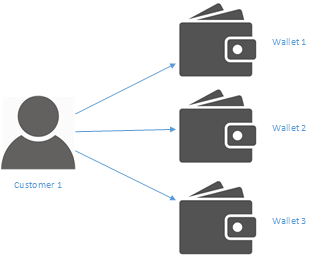
Funds can be transferred between wallets held by a single user or between wallets held by different users.
Creating a vault
1. Get the ID of the customer
When they are created, vaults must be assigned to a customer. The first step is therefore to obtain the Id of the customer who will own the vault.
When you create a customer object the result will contain a unique id that can be used to identify the customer.
Below is the example response when a Natural Customer object is created.
{
    "id": "string",
    "customerType": "string",
    "nameDetails": {
      "title": "string",
      "firstName": "string",
      "lastName": "string"
    },
    "number": "string",
    "thumbnail": "string",
    "address": {
      "addressId": "string",
      "address1": "string",
      ...
    },
    "createdDate": "2017-05-23T23:13:11.931Z",
}
Using the ID from the above request construct a new JSON object
2. Construct a new request
To create a new wallet three items of information are required
| Field Name | Description |
|---|---|
| HolderId | The id of the user to whom the wallet will belong (as seen above) |
| Name | The name of the wallet, this can be used to identify the wallet to the customer |
| CurrencyCode | The ISO 4217 code of the currency the wallet will hold (currently only GBP is allowed) |
This data should be formatted as a JSON object as shown below.
{
  "holderId": "string",
  "name": "string",
  "currencyCode": "string"
}
3. Send your request
Once you have created the above object you can send it as the body of a post request to the /api/wallets end point
var data = JSON.stringify(Mdeol);

var xhr = new XMLHttpRequest();
xhr.withCredentials = true;

xhr.addEventListener("readystatechange", function () {
  if (this.readyState === this.DONE) {
    console.log(this.responseText);
  }
});

xhr.open("POST", "http://example.com//api/Wallets");

xhr.send(data);
If the request is successful the response body will contain the following information
{
  "id": "string",
  "holderId": "string",
  "number": "string",
  "name": "string",
  "status": "Open",
  "balance": 0,
  "opened": "2017-06-02T10:24:22.654Z",
  "currencyCode": "string"
}
Updated less than a minute ago